











Crunching numbers may not be your forte, but every online business needs a strong eCommerce accounting plan. You’ll thank yourself later for enlisting some help to record and analyze your revenue, expenses, debts, and deductibles.
Tracking your financial matters helps you understand the health of your business and ultimately allows you to make decisions based on real numbers, not just feelings.
Ecommerce businesses face their own unique set of challenges—retaining customers and finding the right mix of technology, to name a few. Then there are the complicated tax matters that arise when you sell across state lines. Another key decision you might face is whether to continue expanding or consider selling your Shopify store. This decision requires a thorough understanding of your financial standings to ensure profitability in such transactions.
- Bookkeeping and accounting for eCommerce
- Types of accounting software
- How do you do eCommerce accounting?
- What does an eCommerce accountant do?
Whether your business is exclusively online, or you also sell products in a brick-and-mortar shop, read on to learn how accounting for eCommerce can help you streamline and grow.
Bookkeeping and accounting for eCommerce
Bookkeeping and accounting are often used interchangeably, but they are not the same. Both are important for maintaining the financial strength and sense of order for an online business.
Bookkeeping is the process of accurately recording all of your business transactions. You will track sales and returns, all payable invoices, receipts for materials costs, and more. Bookkeeping records and codes all money that comes in and out of your business.
Accounting professionals then use that information to file taxes and generate reports that help you understand the past and plan for the future. Once your bookkeeping professional has collected financial data, they may pass it to an accountant who can analyze it and provide insights. For instance, bookkeeping means recording every sales transaction. Accounting means creating a report that determines your sales trends and profit margin.
Types of accounting software
Ecommerce accounting is taking place in the 21st century, and your software should reflect that. While desktop software may work for a very young company with a handful of sales, a cloud-based option is the only viable long-term solution. Desktop software works on your hard drive and may involve spreadsheets. Online accounting software—also called cloud accounting software—is much more dynamic and can integrate with a variety of accounting tools and payment platforms.
Outdated desktop software that can’t integrate with your payment platforms or other online tools can lead to a few problems.
- Limited access: You can only access your data from the one computer where the software is licensed.
- Outdated operation: Desktop software rarely offers access to the same conveniences that an online program can. And, if something breaks in your desktop software, you may have to replace it or redownload the program — which is a headache.
- Hard to back up: If something were to happen to the device where your information is stored, you risk losing all of your financial records.
Online accounting software like Xero or Quickbooks has a few distinct advantages for online businesses.
- Constant availability: A cloud-based software can be accessed 24/7 from any device with Internet access, by more than one person.
- User controls: You can restrict access for different users so they only see the information needed to do their jobs.
- Integration: It’s easy to link directly with bank and credit card accounts, inventory, and payroll systems.
How do you do eCommerce accounting?
Keep in mind that an online business has all the accounting obligations of a brick-and-mortar store, plus additional factors. For instance, an in-person store with one location doesn’t have to wonder about which state’s sales tax applies to their goods. An eCommerce business also has a lot of website maintenance costs and will probably work with more payment vendors than a traditional business.
Here are some fundamentals to get you started with accounting for your eCommerce enterprise.
Set up business accounts and tax information.
First things first: your business should have separate business bank accounts. This makes tax time much easier because the IRS will have more clarity about which of your finances are personal and which are business-related. If you set up an LLC or corporation, the IRS requires you to keep a dedicated business bank account. Sole proprietors are not legally required to do this, but it is still recommended. Your business should also apply for an Employer Identification Number (EIN) for tax and payroll purposes.
Find a way to get paid.
As an online business, no one is handing you cash to make a purchase. This is the good news and the bad news. You have more payment options available as an online vendor, ranging from Apple Pay and Shop Pay to credit cards and PayPal. You also have a more complicated road to navigate. You’ll need to figure out which payment platforms are right for you based on customer demand and merchant fees (which you’ll be responsible for). Once you choose payment methods, you’ll add the appropriate widgets to your website checkout process.
Research your tax obligations.
Ecommerce businesses that are selling products across state lines need to figure out which sales tax they are responsible for. In some states, an online store charges sales tax based on where the company is located. There are 12 origin-based states, including New Mexico and Virginia. All other states have destination-based rules for online stores. That means you must charge sales tax based on the address you are shipping to.
Establish a general ledger.
Your online business requires a general ledger. This vital document tracks every single income and outgoing transaction. It gives you a real-time look at what you’ve spent and who has paid you. As an online business that can make sales around the clock, leveraging online software to keep an accurate ledger is smart. Your ledger helps you make growth projections and identify areas of overspending.
Track cash flow.
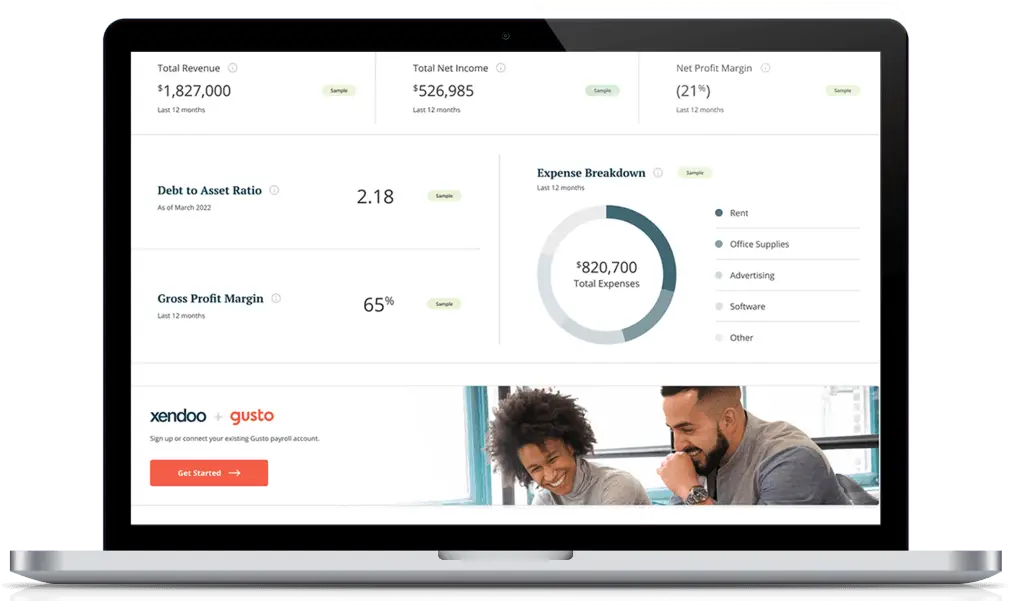
In addition to your company’s income statement, which tracks revenue vs. expenditures over a period of time, you’ll want to generate cash flow statements. This report specifically reveals cash inflows and outputs. You want to have more cash coming in than what is going out. This ensures you earn a profit and can cover any current debts.
Run regular bank reconciliations.
Banking mistakes can really add up, especially if there is an underlying issue. You’ll want to compare your internal transaction reports with your bank account. A major discrepancy could mean that your website is not charging the correct amount or that you have not actually received money for all accounts receivable marked paid.
What does an eCommerce accountant do?
An accountant will take your bookkeeping figures and generate useful reports. They can offer meaningful insights based on your current sales trends and anticipated expenses. For instance, a great accountant may be able to predict an increase in shipping costs or notice that certain materials cost more during the summer months. They can tell you when you have the funds to hire a new employee or when you should cut back on overtime pay.
An eCommerce accountant may also look for ways to lower the cost of goods sold to increase your profit margin. And, based upon the contents of your balance sheet (which track assets, liabilities, and shareholder stake) your accountant may be able to recommend a debt pay-off schedule based on your current revenue.
You will come to rely on your accounting staff to guide you in your business planning. You don’t want to scale your online business too quickly. If you start offering more products online before you can handle the increase in shipping expenses or have the staff box the products, you could end up over your head.
When your small business is just starting out, using accounting software on your own may be a realistic option. Soon you will need assistance. As soon as you notice your accounting duties are taking away from your research and development or other essential duties, it’s time to call in reinforcements.
xendoo handles everything from catchup to taxes to daily bookkeeping. We will pair you with an expert who knows about your industry and can deliver timely financial updates. Our team is invested in your success and you’ll be working with real people who become trusted partners to your internal staff. You can go back to doing what you love and leave the numbers to us.
Online inventory management
Traditional inventory management is often a tangled web of ordering, receiving stock from suppliers, storing and tracking that stock, and monitoring sales. This means lots of manual data entry into a number of systems.
By connecting your eCommerce accounting software with an inventory management system, you can streamline your inventory tracking process. Linking the two systems ensures that financial information is updated automatically as inventory changes. Instead of spending hours counting supply, the information about stock automatically flows from your inventory software to your accounting software, recording everything from revenue to tax. This saves you time and money.
Chart of accounts for eCommerce
A company’s chart of accounts refers to the categories you use to code different types of transactions. It is often helpful to create high-level categories and sub-categories. Many businesses identify assets, liabilities, and shareholder equity at the highest level of their chart. Your sub-categories encompass transactions like online sales, returns, chargebacks, and shipping costs, among others.
As an eCommerce business, you will have some unique sub-categories that other businesses don’t. Inventory storage, out-of-state taxes, eCommerce platform costs, delivery expenses, website copyediting, and other expenditures will need to be tracked for accurate accounting.
Numbering your chart of accounts creates an organized methodology for coding your transactions. For example, you may code Amazon sales as 00001, a credit. Amazon discounts might be 00002, a debit. Coding your transaction categories numerically helps an eCommerce accountant maintain a ship-shape ledger. Many programs will categorize any important transactions automatically, saving you a ton of time.
Another important aspect of your chart of accounts is noting which expenses are tax-deductible. The IRS allows you to deduct a variety of business expenses that are ordinary and necessary. You may miss out on ways to lower your business’ tax bill if you overlook a deductible expenditure.
By setting up your chart of accounts to be tax-ready from the start, you set yourself up for success with sales tax compliance and can maximize your deductions.
Tracking sales tax
If you sell products online or have multiple fulfillment locations, keep in mind that various Internet sales tax rules may apply to your business. And if you also sell your products through a brick-and-mortar location, separate sales tax regulations will apply to those transactions.
Sales tax can also be a tricky business for Fulfillment by Amazon (FBA) sellers. If you store inventory in an Amazon Fulfillment Center, you will owe sales tax in that state along with the state where you operate. Yes, it can get tricky pretty quickly.
Make sure your software can handle the latest tax laws for online sales. You also want to work with accountants and advisors who are up to date on all of the particular sales tax rules that apply to your e-commerce business so you can stay compliant and avoid costly penalties.
IRS penalties add up. Not only does the government fine you for failing to pay or collect adequate state taxes, but you will pay interest on your penalty. The best thing you can do for yourself is find an accountant well-versed in the complex tax situations online stores encounter. You may need a seller’s permit to collect sales tax from another state or encounter other unexpected paperwork. A professional will get it sorted out for you.
At xendoo, we understand the unique challenges eCommerce businesses face. That’s why xendoo CPAs stay up to date on all the latest regulations so you don’t have to. To see how xendoo can help you with your e-Commerce accounting, you can schedule a free consultation today.
Editors Note: This post was updated on March 21, 2022, for accuracy and comprehensiveness.