

Lil Roberts joins Kison Patel of Boss Move Podcast to Discuss The Elements of Success

Success is not about luck and chance. It’s about visionary leaders who intentionally pursue the critical elements every business needs to be successful. Join Kison Patel from Boss Move Podcast and his guest Lil Roberts, Founder, and CEO in the episode Critical Elements of Success as they talk about the secret ingredients for success and how to get them.
Lil Roberts, CEO Joins The y.FTL Panel at Endeavor Miami

Endeavor Miami hosted their y.FTL panel, the second panel in their y.FLORIDA series. Lil Roberts, xendoo’s CEO was one of the speakers. As Florida’s entrepreneurial ecosystem continues to develop they will continue to shed light on the strength of Florida’s entrepreneurs. Honored to be part of an amazing night with incredible people!
These are the women in Miami tech you need to know | South Florida Business Journal
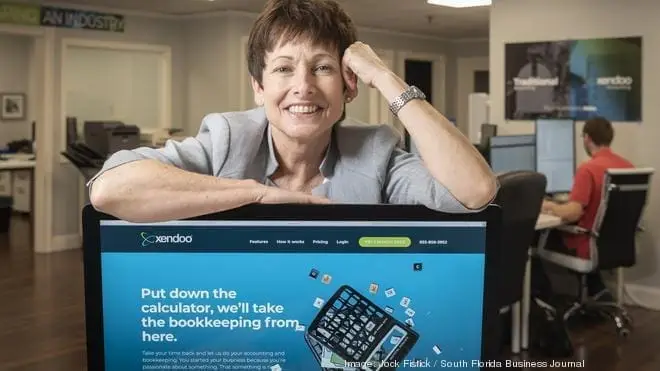
The Miami tech movement wouldn’t be what it is without the women founders, executives, nonprofit leaders, and venture capitalists who have spent years championing the region’s innovation community. An article by Ashley Portero, Senior Reporter, South Florida Business Journal. Read more here
Low-Burn | Scaling Your Startup S2 E8 with Neyborly’s Ben Seidl & xendoo’s Lil Roberts | E1224

When it comes to financial health as your scaling your startup there are six steps to healthy financials for scaling your startup. Watch for insightful tips for your small business by our CEO and Founder Lil Roberts, at This Week in Startups – Scaling your Startup. E1224 of Low Burn.
Importance of LIVE events & What’s the Future of Ecommerce | Lil Roberts | Ep. 173

The new buying habits are post-pandemic! What to expect? xendoo CEO and Founder Lil Roberts is back to share with us the new buying habits post-pandemic and how eCommerce fits into retail’s post-pandemic future. “We believe business owners should have time to do what they love, build their business – not do bookkeeping.”
Top 7 Requirements to Secure Ecommerce Funding (Hint: They’re Not What You Think)

In the past, online sellers often had to dig into their own pockets to fund their eCommerce business dreams. Since small or growing businesses are technically high-risk investments, banks and other financial institutions were reluctant to part with their cash to help eCommerce sellers. But times have changed. Today, there is a growing number of funding options eCommerce entrepreneurs can tap into to make even their biggest, hairiest goals reality. Great news, given that 9.5% of businesses without financial capital say it negatively impacts their profitability. Yet, many eCommerce sellers are stuck in their ways, seeking capital from red tape-heavy banks or going without any funding support at all. In fact, a staggering 50% of UK SMEs don’t look beyond traditional funders—and the tunnel vision can definitely cost them. The good news? It doesn’t have to be this way. To prepare you to face your next funding application with confidence, let’s jump into some of the requirements you’ll need. Ready for a flexible funding solution? Learn more about how we help eCommerce owners improve their cash flow. Secure ECommerce Funding the Simple Way How to Fund an Ecommerce Business: Know Your Options What Do I Need to Secure Ecommerce Funding? 1. Proof your business is on the right track 2. Know what eCommerce funding you need (and what for) 3. Showcase your good moral character 4. Get your paperwork in order 5. Show off a little 6. Clean up your credit, stash away cash, and get collateral (but not for the reasons you think) 7. Be mentally prepared to move on The Blueprint for Getting Your Ecommerce Business Funded How to Fund an Ecommerce Business: Know Your Options Ecommerce funding has come a long way since its inception, and there is now a potential capital source to suit every business size and budget. Here’s a quick rundown of the most common eCommerce funding options: Working capital: The seller receives funding to cover gaps in cash flow for day-to-day business expenses like shipping costs, supplies and utilities, or invest in a new product line, ad campaign or additional inventory for peak sales seasons. Cash advances: The seller receives a lump sum and agrees to pay a percentage of their monthly turnover to the lender until the advance is paid in full—note: cash advances aren’t loans. Invoice factoring: The business owner sells their accounts receivables (due invoices) to a factoring company at a discount with fees added on top. The factoring company then releases the funds to them. Crowdfunding: The entrepreneur pitches their idea on a dedicated online platform to the masses, and individuals can choose to invest. There are three kinds of crowdfunding: debt, donation, and equity crowdfunding. Peer-to-peer lending: Usually facilitated through an online platform, the individual receives funding from a person instead of a financial institution. Angel investing: The business owner sells a stake in their business to a high-net-worth individual in return for capital. Are you struggling to decide between cash advances and working capital loans? We can help. What Do I Need to Secure Ecommerce Funding? Thanks to the flexibility of some of the newer, more modern funding options, today’s funding requirements for growing eCommerce businesses tend to be much more flexible than those of traditional funders. While most alternative eCommerce funders won’t throw out your application for lacking things like management expertise, collateral, or credit, there are some standards you’ll have to meet. Let’s break these down: 1. Proof your business is on the right track Alternative funding providers are all about businesses with results that prove they’ve got a promising future. No matter who you acquire eCommerce funding from, there’s one thing your provider will want to know: that they’ll get their money back plus a fair return. While you don’t have to be the next overnight Amazon sensation to prove your worth, you must show you’re a viable business and a low-risk investment. Here are some things you can provide to show your business is worth the investment: Calculations that demonstrate your business has a high ROI, net operating income, and Debt Service Coverage Ratio (DSCR). (More on this in a minute ). Documents proving your business consistently turns a profit. Store reports showing sales volume and minimal product returns. Statements demonstrating you have sufficient liquidity to repay a loan, plus its interest and charges. Records showing you’ve been in operation for at least 12 months. If you meet these requirements, securing funding becomes a win-win situation for everyone, and you’ll have better chances of getting approved. Looking for a faster solution? Find out how you can pre-qualify for up to $1,000,000 in less than 5 minutes. 2. Know what eCommerce funding you need (and why you need it) By the time you’re ready to start sending applications to prospective funding providers, you should have concrete answers to these things: Your reason(s) for applying for external funding. The intended purpose of the cash injection. How much capital you need. Not only will this help narrow down the type of funding you need (and suitable providers), it’ll also show you’ve done your due diligence. Taking on funding is no child’s play, and mistakes in this area can cost you. Funding providers want to know you understand the risks involved and are prepared to take on this commitment. Here’s how to show eCommerce funders you’re ready, step-by-step: Create a documented breakdown of the capital amount you need for each task (adjusted with a buffer for unplanned bills). Work out your return on investment (ROI). Are you making enough returns to make funding feasible? Note long term debt reduces ROI. Analyse your net profit income. How healthy is it? Will you have enough liquidity in your business to operate once you start to repay successfully? Assess whether any existing debts will inhibit you from making repayments. Calculate your Debt Service Coverage Ratio (DSCR) to help you with this task. These are the three equations you’ll need: 1. ROI % = (Net profit) / Cost Of Goods
Selling on Amazon vs. eBay: What you need to know

Ready to start selling your products online? Or have you already built a web presence and you’re looking to expand? From marketplaces like Etsy to building and hosting your own website on Squarespace or Shopify, small businesses have plenty of platforms to sell their products online. But eventually, most professional sellers find themselves asking: What are the pros and cons of Amazon vs. eBay? Amazon vs. eBay: Who has the biggest market for selling potential? By the sheer number of visitors, selling on Amazon is the winner here: 214.8 million people visit Amazon each month, compared to 106.9 million for eBay. However, both of these numbers represent huge potential audiences, so to really make the right choice about selling on Amazon vs. eBay, you’ll want to break it down. eBay’s audience is more international than Amazon: 57% of its revenue comes from international operations. Amazon doesn’t release these figures, but analysts estimate about 33% of its sales are international. eBay is also known for having “niche” customers searching for specialized products and second-hand goods. The real winner here depends on what you sell and who you sell it to. Amazon vs. eBay: Which channel is more competitive? Amazon is much more competitive than eBay. Amazon rewards sellers with the highest-quality items at the lowest price. There are far more sellers on Amazon, and you may be competing with factory-direct prices from China or even with Amazon itself. On the other hand, eBay follows an auction format that will show shoppers many different options, conditions from new to used and shipping options, allowing sellers more opportunities to reach them. eBay advertising is also less competitive and therefore cheaper. Amazon vs. eBay: Which channel offers the best shipping and fulfillment? Winner: Amazon. When sellers opt for fulfillment by Amazon FBA, they’re able to use the retail giant’s warehouses, shipping, and customer service – for a fee, of course. They’re also eligible for Amazon Prime and the benefits that come along with it. Just remember that you may have to pay sales tax in those states if you use Amazon’s warehouses. Make sure you follow eCommerce bookkeeping tips to keep your records in order. While domestic sellers are responsible for their own packing and shipping on eBay, the company does offer its Global Shipping Program. This allows sellers to use its “hubs” to ship internationally, with eBay taking care of the customs forms and import fees and providing tracking. This is another reason eBay is so popular with international sellers. Amazon vs. eBay: Whose fees reign supreme? Overall, most sellers find that eBay’s fees are lower. But this doesn’t tell the whole story. Both platforms’ fees depend on what’s being sold, the type of account you have, and more. On Amazon, you’ll likely want a Professional Seller account, which will run you $39.99 per month. You’ll also pay a 15% commission on Amazon, plus a closing fee. If you go with Amazon FBA, you’ll pay those fees as well. On eBay, you’ll pay about $0.35 for each listing you create. With a $28-per-month Basic Store account, you’ll get 250 free listings. Once your item sells, eBay takes only a 10% commission. However, this doesn’t include payment processing, while Amazon does. You’ll also then need to figure out the shipping yourself. Once again, the answer to the age-old question of selling on Amazon vs. eBay depends on your sales volume and type of product. Here’s one point for eBay, however: One survey found that eBay was ranked number one by sellers in terms of ease of use, customer service, and profitability – while Amazon came in seventh. The verdict: Amazon Pros: Reach a large audience Amazon FBA is a convenient option for most sellers Easy to use interface and tools Cons: Highly competitive Slightly higher fees Less freedom over branding, product descriptions, and policies Which eCommerce sellers are Amazon right for? Sellers with a high volume Sellers with high-profit margins Sellers of non-specialty items The verdict: eBay Pros: Easier international sales and expansion Control over branding, listings, and return policies Lower fees Cons: No domestic shipping program Smaller audience Less straightforward user interface Which eCommerce sellers are eBay right for? International sellers Sellers of used and customized items, collectibles, and niche products Sellers who desire more freedom over the selling process You can even decide to settle the Amazon vs. eBay debate by selling on both platforms. No matter what you choose – and especially if you decide to sell on both – you’ll need expert eCommerce online bookkeeping to keep your books in order and ensure you keep up with sales tax laws. At xendoo, we work with eCommerce sellers on both platforms to manage bookkeeping and accounting, so they can focus on what’s important: selling!
Pros and Cons of Putting Your Small Business on Amazon

Ecommerce is booming. Total revenue will reach nearly $4.6 billion in 2021 and grow at an annual rate of 4.6% over the next five years – reaching $5.6 billion by 2025. It’s easy to see why owners of small and medium businesses are asking themselves how they can get a piece of the eCommerce pie. One popular option—the Amazon small business marketplace. In the first quarter of 2021, 55 percent of the units sold on Amazon were from third-party sellers. For a company with sales of more than $300 billion, that’s more than pocket change. But what are the pros and cons? And is it worth the trouble? What is Amazon marketplace? The Amazon marketplace is an eCommerce platform that allows independent vendors and sellers to sell their goods on Amazon. The platform allows Amazon to forego the typical retail model, where it sources materials, then produces and stores each of its products until shipment. Instead, third-party vendors put products on Amazon and take care of the details, while Amazon gets a cut of the profits. What are the pros of selling on Amazon as a small business? There’s no question that Amazon is popular with small businesses: In 2018, nearly three-quarters of Amazon sellers had between one and five employees. And Amazon for small business does have plenty of benefits, like the following. You can reach a larger audience One of the biggest benefits of selling products on Amazon is that it can connect you with a wider audience: There are more than 200 million Amazon Prime members worldwide, and that’s not counting site visitors who don’t subscribe to Prime. That’s a huge audience for Amazon small businesses. Amazon can take a lot of the work off your plate Getting set up with Amazon marketplace is relatively easy: Just sign up and add products to the catalog. If you want Amazon to do more work for you, you can sign up for Amazon FBA, or Fulfilled by Amazon, which allows you to use Amazon’s warehousing, packaging, shipping, and customer service. Amazon has tools to help you sell In addition to Sponsored Ads – which actually make Amazon the third-largest digital advertiser behind only Google and Facebook – Amazon small businesses have access to MerchantWords, a proprietary keyword research tool. It uses actual Amazon data to help you optimize your product names, descriptions, and ads. Amazon provides technical support Amazon Seller Central is the platform’s support team for Amazon small businesses. It’s available 24 hours a day, although most sellers will be required to submit a request and wait for a callback. Still, most sellers receive a prompt response and are happy with the support they receive What are the cons of selling on Amazon as a small business? Amazon Marketplace sounds pretty great, right? For many small and medium businesses, it is. But it also has a few drawbacks you should be aware of. It can be expensive With charges for selling, referral fees, and Amazon sales tax, the cost of selling on the marketplace can quickly add up. Sellers without a monthly plan will pay 99 cents per item sold, while those with a Professional Plan pay $39.99 per month. If you opt for extra features, like Fulfilled by Amazon, expect to pay more fees. If you are looking to start selling online there are options to secure ecommerce funding. It can be time consuming Getting set up with Amazon Marketplace is easy – understanding how to be successful there can be more time-consuming. Diving into the tools Amazon provides and optimizing your product take time. Plus you’ll need to figure out Amazon bookkeeping and accounting, inventory management, and more. The competition is fierce There were 1.1 million active Amazon marketplace sellers in the United States alone in 2019. Amazon Marketplace is also incredibly popular with Chinese merchants, some of whom sell products at super-low, factory-direct prices. You’ll even compete with Amazon’s own private label brands. And fake reviews abound on the platform, with competitors using bots to write thousands of five-star reviews at once. It’s Amazon’s world, you’re just selling in it Some Amazon small businesses feel they don’t have much power over the selling process. There are reports of Amazon punishing businesses for selling at lower prices on other marketplaces, or pressuring them to sign up for extra services. Should I use Amazon for my small business? There’s no one-size-fits-all answer to whether you should sell products on Amazon. Certain categories, like personal care, beauty, and home goods, seem to have greater success on the platform. Businesses with high margins, who can afford to give Amazon its cut, can also do well. However, success with Amazon for small business depends more on your ability to figure out what works for you than on the type of business. xendoo can help dive into your books and help you make a sound decision on whether to sell on Amazon Marketplace. If you’re already a seller, we can ensure your books are in order – allowing you more time to focus on selling. [av_sidebar widget_area=’Blog Post Disclaimer’ av_uid=’av-om2w’]
Tips to Increase Retail Sales for Your Small Business

This past year has been incredibly hard on retailers, especially small businesses. Retail sales plunged more than 20% between February and April last year, but with pandemic restrictions easing, the industry is starting to recover. As folks are venturing out more, it’s the perfect time to refresh yourself and your sales associates on tips to help increase retail sales and work towards building your business back up! Make your customers feel safe Many people are finding it tough to return to their pre-pandemic selves quickly and are still moving with caution. Help them feel at ease by reminding them they are safe in your shop. Take note of what protocols major retailers are following. For example, hand sanitizer can be available at the entry and the register. Use signage to share your mask policy, cleaning protocol, and any policies on the dressing room or how to use ‘tester’ products. The safer customers feel, the more likely they are to purchase, which will help increase your retail sales. Curbside pickup and local delivery Many stores began offering curbside pickup and local delivery in 2020, and most customers have become accustomed to these services. Keep in mind that today’s customers value convenience, so continue to offer these alternative methods moving forward. Train your staff While refreshing your team on cross- and up-selling, ensure they are up to speed on the basics, too. For example, do they need a reminder on any specials or promotions you offer? Ensure they are experts on your store’s products and are as informed as possible on your customer service expectations. Please encourage them to think ahead about how they might answer specific questions customers might ask, including all frequently asked questions. If your staff can put your customers at ease, they are more likely to purchase from you than your competitors. The savviest sales associates know how to cross-sell and up-sell. When a customer is interested in one particular item, the savvy salesperson suggests a corresponding item to go along with it. “If you like that, you will love this, too!” Up-selling suggests a more expensive alternative to the item the customer is already interested in buying. “Oh, that one you have is great, but have you seen this (more expensive) version?” If your customer leaves with an item they will enjoy more and feel like they got a great deal, they are more likely to be a repeat customer, which can further help increase retail sales. Merchandising Make the way you merchandise or display your products a priority. Keep your displays fresh and regularly move merchandise around the store, creating a sense of newness and having your regular customers look at products they may have otherwise passed. Feature new and seasonal products near the entrance. Keep everything clean and organized, and ensure it’s easy to navigate the store. Keep popular and inexpensive items near the registers to encourage impulse purchases during check-out. It would be best to keep up on your inventory accounting to ensure that those displays have enough product. Make it personal 80% of companies are more likely to purchase from a company that offers them a personal experience. So, how might your store offer a personal touch? Branded items are a great way to connect with your customers creatively – ensure your logo or taglines are on bags, receipts, and automated email receipts. Consider slipping an extra treat into shopping bags, too. Perhaps a small button or magnet with your logo and website. And the best way to get personal is to connect with your customers. Make it a priority to chat, remember their names, and take note of the types of products that interest them. Loyalty programs Customers love loyalty programs! Many small businesses still enjoy using classic “buy 10, get 1 free” style punch cards, but there are great digital-focused loyalty programs, too. Options like Loopy Loyalty and Smile.io encourage customers to shop with you again and engage with your brand. And get creative! These programs offer ways to customize the program to match your branding and speak to your customers. As you build your loyalty program, ensure you aren’t creating an unattainable goal. Earning $5 for every $25 you spend feels much more exciting than earning $1 for every $50, right!? Make time to analyze Small retail store owners are notoriously stretched for time, but it’s essential to set aside time to review what sales tactics are working and what aren’t. Look at the numbers and strategically think about what might have led to increases or dips in sales on any given day. This is where having professionals like the team at xendoo manage your retail bookkeeping can go a long way. You can quickly review the numbers through accurate and timely reports and determine the most effective sales strategies. It’s an exciting time for retailers to have a fresh start! Seize the opportunity to train your staff on new sales tactics, refresh your inventory offerings and displays, and get creative with new ways for your customers to engage with your brand. By outsourcing your bookkeeping and accounting to the team at xendoo, you’ll save time and money, and you’ll finally have the data you need to be more strategic about increasing retail sales and remaining profitable.
How to Setup Your Online Store to Integrate Accounting Software

You’ve set up your online store set, and orders are starting to come in. But in your rush to pack, ship, and sell, there’s a good chance you haven’t made time to integrate accounting software with your eCommerce software. By downloading a third-party app plug-in, you are just a few clicks away from saving time and money by automatically sharing data between your accounting and eCommerce programs. It sounds like a lot of work, but it’s simple! Most popular online accounting software options like QuickBooks, Xero, and FreshBooks all have a menu where you can search for compatible app plug-ins. And most popular eCommerce programs like Shopify, Squarespace, and WooCommerce have a corresponding app available from a third-party software developer. So you can easily install an app to sync the two programs! What to Look for E-Commerce Accounting Software As soon as you begin spending or making money, it’s time to set up your eCommerce bookkeeping and start accounting. There are many affordable online eCommerce accounting software options available. Programs such as QuickBooks Online or Xero store a business’s financial data in the cloud and are always connected to the internet. In addition, they automatically receive and update your data by connecting to your bank accounts. Sounds easy, but not all accounting programs are the same, and there is a lot to choose from. When deciding which program is best for you, you’ll want to consider the following: Compatibility – Does the program work with all of the devices you plan to use? How many users can be simultaneously logged in? Can your international team members log in, too? Cost – Many options have a free plan, but the pricing goes up as your business scales and grows. Support – What are the customer service options? Does the program offer expert bookkeepers and accountants you can hire to take on the work when you are ready to delegate? Can they help you file your taxes? Additional Services – All of the programs offer basic bookkeeping and financial reporting, but what kind of extra offerings does the software have? Some eCommerce trends include hefty employee management solutions to help with payroll, time tracking, and benefits, while others may offer project management tools. Some offer payment processing through third-party partnerships. Integrate accounting software with your eCommerce program – Make sure the two programs sync so you can limit the amount of data entry you are doing. Ideally, you will be able to eliminate manual data entry of sales, invoices, customers, products, and more. Most popular eCommerce software options, such as Squarespace and Shopify, integrate easily with third-party app plug-ins compatible with accounting programs like QuickBooks and Xero. Once synced, your inventory, orders, customers, and shipping can be automatically updated and will stay accurate. And getting started is easy! Most of these integrations only require a quick authorization and a few clicks to import your eCommerce data into your accounting program. Below is a list of some popular eCommerce platforms that offer integrations with popular online accounting software programs. Keep in mind that this list isn’t exhaustive, but these are the most popular eCommerce platforms that easily integrate with accounting software like Xero and QuickBooks Online. Squarespace WooCommerce BigCommerce Shopify Square Integrating your accounting software with your eCommerce platform can help save you time and money. You’ll be able to get an instant view of your financials, allowing you to plan your sales strategy more effectively. As your eCommerce business grows and you decide to sync your eCommerce software with your accounting software, there are many aspects of eCommerce and accounting that you will want to keep in mind for this integration. For example: Inventory Management – You will want to be able to connect multiple sales channels such as your brick & mortar’s Point of Sale, your Online Store, and your Pop-up location to ensure stock levels always stay up-to-date. Choosing the correct payment gateway – Does the available option match your needs? Will international business be supported? Tax settings – How does the software help you with your sales tax reporting? What role does it play in monitoring important tax deadlines? Why You Should Outsource Your E-Commerce Bookkeeping and Accounting As your eCommerce business grows, you will want to outsource your bookkeeping and accounting to professionals. Even though app integrations with the best accounting software for small businesses are great, many automatic tools such as your monthly reconciliation can be inaccurate. Even a minor error in your bookkeeping can have a ripple effect and lead to everything from your financial reports being inaccurate to your marketing budget and your tax payments. It’s best to have an experienced set of eyes on it! These professionals can even find tax breaks you were missing and help you save even more money! Spend more time growing your business and less time crunching the numbers by working with the team at xendoo. [av_sidebar widget_area=’Blog Post Disclaimer’ av_uid=’av-om2w’]